Showing posts with label Freeware. Show all posts

3D Home Design Software Download (Freeware)

Note: Valid through December 31, 2015 (unless otherwise expressed)
I’ve been looking for free 3D home design software, so far I just found one freeware that I think is good enough, that is Envisioneer Express 3D Home Design and Project Viewer software by Cadsoft. If you have a plan to build a house and you want to design it by yourself then you'll need this program. It is simpler than any programs specialized for designing buildings in 3D perspective like autocad, archicad, DoubleCAD and etc. You don’t have to be an expert / architect to mastering this program, Envisioneer Express 3D Home Design software is a quick and easy modeling tool that helps users create home plans smoothly and efficiently with 3D projection view and navigation.


The 3D home design software includes basic designs, with this program you can easily create models such as exterior / interior walls, doors, windows, openings, roof and more. It also has viewing features which let users viewing the model in 2D / 3D view, walking around, flying around, resetting the camera view and changing the display mode.

Most features are automated and easy to use, you can create each room in details, plan, decorate, visualize and make your DIY home projects quickly and accurately. If you are confused with 3D home design software features / don’t know how to use it, Cadsoft provides Quick Start Guide tutorials for metric and imperial version available on its official website.

The application can be used on Microsoft Windows operating systems. How to get it? The free version of Envisioneer Express 3D Home Design software is version 5. Just click the download link, fill the form and submit. They will immediately send the free 3D Home Design software download link to your email.

Download now. It's free!
Download now!

PhotoFilmStrip Freeware - Create Slideshow Video From Static Images

Note: Valid through December 31, 2015 (unless otherwise expressed)
Is it possible to create a video from static images? Yes it is. You'll only need a free tool called PhotoFilmStrip. It is an open source software / freeware licensed under GNU GPL and listed at sourceforge. By using the software you’ll be able to create slideshow of your photos and convert it to playable movie file. Moreover, you can also make some customizations such as add effects, music, subtitles, change rotation, crop frame size, motion path and etc.

Click on picture to enlarge!
Image source: sourceforge.net/projects/photostoryx/

This application is very useful and fun especially for those who want to enjoy dynamic photo slideshow in one movie file instead of having tons of pictures in their folder and show them manually one by one. Furthermore it will be easier if they want to share the video with friends or publish it on website or embed the video into powerpoint slides.

PhotoFilmStrip is the easiest solution if you want to create movies from pictures. You can make a slideshow of your image files, for instance: your wedding photos, vacation photos and so forth; compile and convert them into one video file with easy 3 steps. Next, you can play the movie using Cyberlink PowerDVD media player or other audio video player.

How to use PhotoFilmStrip? First, go to tools – import and then load your photos into application. In the main interface you can customize the look and feel of your photos / slideshow / motion path, for example: add effects, subtitles, change rotation, select partial portion of images (crop the frame size), set the duration and etc. If you have done with the customization you can start rendering the video. There are several video outputs available: VCD, SVCD, DVD up to FULL-HD, in render option you can also add audio / music files, transition speed and total video length. Finally, click Start button to create a video from images.

Download PhotoFilmStrip (free)
Download now!

Money Manager Ex - Personal Finance Manager Freeware

Note: Valid through December 31, 2015 (unless otherwise expressed)
If you care about your money and want to manage your personal finance better then you’ll love this program. It's called Money Manager Ex, an easy-to-use portable personal finance open source software which allows you to track your income and expenses, transactions, assets, manage your investments, budgeting and more. You can also create reports of your financial profile easily or generate graph / chart / preview of your financial worth. Money Manager Ex is totally a freeware. It's free to download and use, also portable and supports cross-platform. You can store the program in your USB drive and use it on any computer. It can be used on Windows, Linux and Mac.

Click picture to zoom in

Money Manager Ex has a comfortable interface for managing personal finance or accounting, easy to use and visually pleasing, with the support of illustrative graphics. It enable users to maintain and keep track the assets, money, savings, checking, credit card, stock investment accounts and etc. It also comes with reminders for recurring bills and deposits, and generates cash flow forecasting. The financial reports can be generated with one click.

To sum up, it is a very helpful program for managing your personal finance. It is also easy to use and has complete features. For interested users, you can download Money Manager Ex for free. This is a totally freeware personal financial manager or accounting software desktop / browser version for Windows, Linux, Mac OS X.

Download now!

Recuva Free Download - File Recovery Freeware

Note: Valid through December 31, 2015 (unless otherwise expressed)
Recuva is a popular freeware to recover deleted files and surely it is one of the top free data recovery software. The award-winning Recuva created and published by Piriform which is also the creator of Speccy. The program is very helpful in any case you accidentally deleted important data or maybe you lost your files because of malware attack. By using this application you will be able to restore the deleted files only with few clicks! It can recover deleted files from your computer hard drive even if you have emptied the recycle bin, it also works for USB drive, memory card, iPod and several other storage media.

This free data recovery software has a neat interface and comes with quick-start wizard so it is very easy to use. Recuva allows you to recover deleted files in any format including documents, pictures, music, video or any other format. Recuva is also very reliable because it supports various types of storage media including hard drive, digital audio player (iPod or MP3 player), digital camera card / micro SD Card, USB flash drive or stick / pen drive and so forth.

Furthermore it is able to perform fast search with deep scan technology, quickly and accurately find and restore your deleted files. In addition, recuva can also restore unsaved Microsoft word documents with its ability to rebuild the word docs from temporary files. There is also an option which allows you to securely delete files you want to remove forever, which means the files will not be able to be recovered again no matter what. So if you want to permanently erase any traces of your deleted files you can use this option.

This software is probably one of the best and free solutions for those who want to recover lost files. It is compatible with all Microsoft Windows OS variants. Interested users can get the direct download Recuva latest version via Piriform.

Download now!

DVDVideoSoft Free Screen Video Recorder Download & Review

Note: Valid through December 31, 2015 (unless otherwise expressed)
Free Screen Video Recorder is a freeware program developed by DVDVideoSoft. It's a nice application for your Windows pc that can capture computer screen and produce image or video outputs from screen capturing. This is one of the simplest screen video recorder software. With this tool you will be able to make screenshoots and videos of your display screen. It gives you choices whether you want to capture/record the entire screen, windows application, object (such as a button or icon) or selected region. For screen shoots it can produce image output as BMP, JPG, PNG, GIF and TGA. While for video recording users can save the video as standard AVI format.

Click picture to zoom in

DVDVideoSoft Free Screen Recorder comes with a built in basic image editor that allows users to open an image file and edit it or edit the current image from the screenshoot. It is easy to install and fun to use, to create a video or capture computer screen simply select the corresponding button on its interface. On the setting options you can customize the screen video capture delay, default filename, image / video format, change the languages (it supports English, German, Spanish, France, Italy, Japanese, Korean, Dutch, Polish, Portuguese, and Chinese languages) and etc.

However there are also some cons such as no shortcut keys, no video / audio quality options, no built in media player and etc. But if you want a simple, nice and easy screen video recorder freeware then this program is probably the best alternative for you. Download Free Screen Video recorder full latest version directly from DVDVideoSoft.

Download now!
Click the above button to download

Sweet Home 3D Download, Free 3D Home Design Open Source Software

Note: Valid through December 31, 2015 (unless otherwise expressed)
Sweet Home 3D is a freeware 3D home design software. It is a cross platform open source software, so it can be run under Windows, Mac OS X, Linux and Solaris environment. It enables everyone to create, simulate and design house interior elements such as building rooms and placing furniture. It also comes with 2D and 3D projection preview plus supports view point navigation, as a result you can see what your home design will look like from different point of views or perspectives.

Click picture to zoom in

Sweet Home 3D is an easy-to-use free interior design software. From the main interface you can draw your rooms by creating walls, set the dimension, and customize wall thickness and texture. The furniture can be placed by drag and drop furniture objects from the catalog. There are numerous furniture models you can place in your rooms which are organized by categories (eg. kitchen, living room, bedroom, bathroom and etc). If the existing furniture objects in catalog are not enough for you, there are tons of models more available for free download on contributor’s website.

The free home design software is also able to transform your 2D design into 3D real plan view, to make your creative design looks real. This feature can show how your home will look like after redesign, and of course you can manage or navigate the 3D perspective to view any angle such as rotate, view aerial viewpoint, show virtual visitor viewpoint, zoom in or out and more.

To sum up, Sweet Home 3D is an open source free 3D interior design software that allows you to create and design plan of your house, insert furniture objects into rooms and gives you clear views of each room details with 3D projection view. It is so easy to use that even a beginner can work with it. Best of all it is free and it supports cross-platform OS, can be used on Windows, Linux, Mac OS X and solaris.

Sweet Home 3D free download is available below

Download now!

DoubleCAD XT - a Free Alternative to AutoCAD LT

Note: Valid through December 31, 2015 (unless otherwise expressed)
DoubleCAD XT is a freeware drafting software with powerful 2D CAD capabilities, just like the famous AutoCAD LT. It is a fully functional CAD software for professional use and absolutely the best free alternative to expensive CAD software. It lets you to create, edit, save, open or view DWG, DXF, DWF and SKP (SketchUp) files. The interface, drawing tools, features and functionalities are pretty similar to other paid CAD software like Autodesk AutoCAD. It is also very easy to use, so if you have experience in CAD drafting then you will get familiar with it in no time, even if you don’t have any experience (beginner) you can easily learn how to use DoubleCAD XT quickly.

This software can be used as free DWG viewer and DWG editor, it can also convert, open and save .DWG, .DXF, and .DWF format. Furthermore it also supports SKP format which allows you to import Google SketchUp files, view and edit SKP files on DoubleCAD XT interface. Like AutoCAD LT, this free 2D drafting software has some tools / menus / features to draw objects (line, polyline, point, circle, rectangle, circle, polygon, hatch and etc.), modify objects (trim, chamfer, fillet, erase, rotate, mirror, join, offset and etc.), create various type of dimensions (dim linear, aligned, angular, radius, diameter, quick dimension and etc.), create and manage layers, command line, 3D perspective and Ortho views, ADT compatible self-healing walls, import and export objects or AutoCAD files, customizable geometric aids, and many more.

Watch this video to explore more:


If you are limited on budget then giving this free CAD software a try is a must. After all it is a powerful CAD program for drafting, it is just like a free AutoCAD software in your computer. And best of all it is totally free! This freeware is compatible with Microsoft Windows OS. Interested users can download DoubleCAD XT (latest version) via DoubleCAD.com.

Download now!

JPDF Tweak - PDF Tools Freeware Download

Note: Valid through December 31, 2015 (unless otherwise expressed)
JPDF Tweak is an open source program that contains some useful PDF tools so users can modify or edit PDF files. The program offers some features and tools to change PDF documents, and few of them (tools) are similar to PDFill free PDF tools which I had showed you in the previous post. There are some options included in JPDF Tweak such as rotate, scale, merge and split PDF, reorder pages, add watermark to PDF pages, compress, encrypt / decrypt PDF metadata and password, bookmark, attachments, add file info and more. Moreover you can assign tasks to multiple PDFs (in other word it supports batch processing). This program is a freeware, users can download JPDF Tweak and use it for free.

Another advantage of JPDFTweak free PDF tools is it supports cross-platform, so yes you can use this application on any operating system like Windows, Linux and Mac OS X because it is a Java based software, and the main application is an executable Jar file. However, the program requires Java (JRE) 5 or higher in order to work on your computer.

How to use JPDF Tweak? The program has quite a few tabs on its interface, each tab is a task that contains options to modify your PDFs (Input and Output tab are exceptions). First you should open your PDF documents, go to Input tab and load the PDF(s) you want to change. Next, choose any PDF operation(s) / task (s) and configure the options. If you have finished the customization process go to Output tab and select folder and create a filename. Finally click Run to execute your PDF operations.

Interested users can download JPDFTweak free PDF tools to edit PDF files from SourceForge. Note: it requires Java Runtime Environment (JRE)

Download now!

Winamp Media Player Free Download

Note: Valid through December 31, 2015 (unless otherwise expressed)
The Winamp standard edition full version software is a free and powerful multimedia player with tons of features. It is indeed one of the most popular media player that supports almost all audio and video file formats, a must have freeware software installed in your computer, especially for music enthusiasts. WinAmp lets users to play both offline and streamed video / audio content, including online radio stations and internet TV channels. It comes with a playlist manager and a customizable media library which allow users to manage or organize multimedia files, even it enables you to rip and burn your favorite music CDs. You can change the visual look with skin options, plugins and color schemes, or show visualizations when you play music.

Screenshot: Winamp interface with cool skin, click picture to enlarge!


There are some other features included in WinAmp media player such as portable device support (connect or manage files or sync with your iPod, USB drive, Android smartphones, P4S, Creative Nomad/Zen/MuVo, ActiveSync device and etc), equipped with a built-in browser for media discovery, equalizer, auto tagged or edit your music tags, podcast support, iTunes library import, new skins, and more. WinAmp music and video player is also easy to use, all features like media library, video, browser, equalizer, skin options, color themes, visualizations, and playlist editor are very accessible through the main interface.

In its latest version WinAmp adds some features and improvements to enhance user experience when enjoying multimedia entertainment. You can download Winamp full latest version free via Nullsoft, compatible with all Windows OS.

Download now!

PDFill Free Download - Freeware to Edit PDF Files

Note: Valid through December 31, 2015 (unless otherwise expressed)
PDFill is a totally freeware program that contains several PDF tools to edit or modify PDF documents. This easy-to-use application provides 15 tools all in one application. All features are very accessible because they are showed on the main interface (look at the screen shoot), you have just to click the task and follow the next instruction / procedure, each task is very easy to operate. PDFill PDF Tools free download is free for both personal and commercial use.

Here are the useful 15 PDF tools available in PDFill

Click to enlarge picture!


1. Merge PDF Files
It allows you to combine several PDF files into one PDF file / document

2. Split or Re-order Pages
Split pages from a single PDF file or you can also re-arrange the page sequence, and then create/save into new PDF file.

3. Encrypt and Decrypt
PDFill offers security options provide tools to encrypt and decrypt PDF password and restriction. You can encrypt / protect PDF document with password and create restrictions to your PDF documents such as disable to copy, select, print, change, merge and etc. In addition it also allows you to decrypt PDF files. It supports both adobe standard 40 bit encryption and advanced 128 bit encryption.

4. Rotate and Crop
PDFill allows you to rotate all or selected PDF pages (by 90, 180, 270 degree) and save the document as new PDF. The crop tool enables you to customize the page margins.

5. Reformat Multiple Pages
You can make reformat from an existing PDF file. Multiple pages with added Note lines can be put into one page.

6. Header and Footer
Create notes or add additional information such as date, title, author, page number and etc in header or footer section.

7. Add Watermark by Text
PDFill provides watermark tool to add text watermark to PDF documents

8. Add Watermark by Image
Even you can add logo watermark to PDF documents from image files like bmp, jpg, gif, png, tiff, and wmf.

9. Image to PDF converter
PDFill includes a built-in converter with layout options to convert images to PDF. It supports bmp, jpg, gif, png, tiff, and wmf image formats.

10. PDF to Image Converter
It also adds PDF to image converter so you can convert PDF pages to image format.

11. PDF Form Field Operations
You can use this function to Delete all PDF Form Fields; Flatten all PDF Form Fields so that it is read only; List all PDF Form Fields’ Name and Value.

12. Convert Postscript into PDF
PDFill will enable you to convert PostScript (PS) file into PDF so you can open the converted PS in Adobe Reader.

13. Add Information
Create some additional information into PDF files like title, author, subject, keywords, created, creator, producer and PDF version.

14. Scan into Image or PDF
PDFill comes with a built in free scanner tool. With this option you can scan your printed paper, photo, form, etc. and save them as image or PDF file.

15. Create Transparent Image
In this option you can modify your image to change its transparency level.

Download PDFill PDF Tools free


Portable Screen Capture Freeware - Screenpresso Download

Note: Valid through December 31, 2015 (unless otherwise expressed)
Screenpresso is a nifty tool that can be used to capture your computer screen - to create a screenshot (picture) or video capture. It is a freeware application and also portable screen capture software, so you can save it into your USB stick / flash drive and use on any PC. Not only it's able to capture the entire screen (like print screen) but also able to generate a snapshoot of partial windows screen or region and capture scrolling windows (for example long web page, Microsoft office documents, PDF and etc). Additionally Screenpresso has a built-in basic image editor so it's possible to edit your pictures immediately. And one more advantage is it lets you send or share your images via e-mail, twitter, Gmail, Flickr, Facebook, Evernote and FTP.


How to use? The downloaded Screenpresso file is an executable application so there is no need to install the screen capture software to your PC. Once you have downloaded the program you can run it by double-clicking the screenpresso.exe, next it will active in the system tray. Take a minute to configure the settings: right-click on Screenpresso icon in system tray, and then click Settings. In this menu you can customize the options such as language preference, output folder, screenshoot image configuration and set / add your accounts for image sharing (eg. your twitter, gmail, facebook and etc). Don’t forget to click OK to save your settings.

To start capturing your monitor screen simply press print-screen button. Alternatively you can also choose screen capture options via Screenpresso icon on system tray (press right click to open contextual menu). Choose whether you want to capture the entire screen, region or capture scrolling part.

Once you have captured your screen you can access picture editor. In the image editor you can add some objects using drawing tools such as textbox, arrow, rectangle, ellipse, blur a region and add numbering. Switch to Image tab within the image editor, from there you can crop an image, resize, canvas and create border effect.

To sum up, Screenpresso is a very good free picture & video screen capture software, rich of features and user-friendly. It has screen video capture and sound recorder options on its menu. Yup, good news for you, the video capture and audio recorder tools and features are now available!

Download Screenpresso, it's free and portable!


Personal Finance Manager Freeware Download

Note: Valid through December 31, 2015 (unless otherwise expressed)
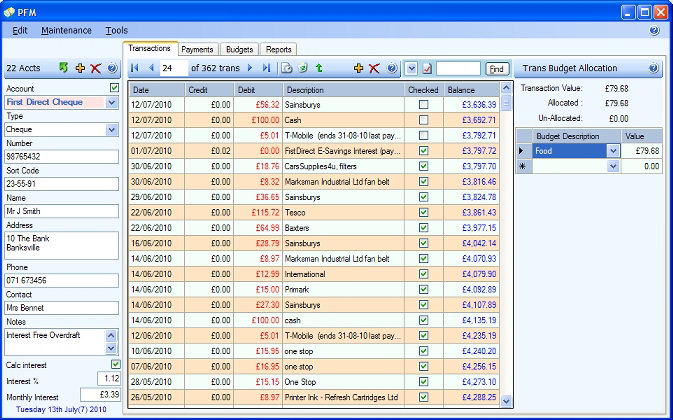
Freeware Personal Finance Manager aka PFM is a finance software which will enable you to manage or track your money, record transactions and budget information of your accounts. By using this application you can update the recorded income and expenditure, PFM personal money manager will automatically calculate a balance. There is also a checking box you can use to indicate if a transaction has been reconciled. With Personal Finance Manager it's very possible to create a schedule for future transactions, add payments to be credited or debited automatically on the future dates.


In addition PFM allows you to create reports of your financial profile on each account. You can generate pie charts, graphs, balance plots and multiple page color reports. Next you can print your financial reports or export to other popular formats.

Other features of Personal Finance Manager include the facilities to create / manage budget transaction allocations, supports multi accounts, ability to copy or move transactions between accounts, generate various type of financial reports, manual column width adjustment, print or export to file and more…

Interested? Give it a try! For Windows OS only.